AI Image Localization: Ship Multilingual Creatives in One Pass, No More Editing Images One by One
Upload images and AI detects the text, translates it into 130+ languages, and re-renders it in the original layout — multilingual creatives in one pass.
Your big quarterly update ships, the hero banner is finally approved — and then you remember it still needs English, Japanese, Korean, German, Arabic, a dozen versions in all. Anyone who has run overseas releases knows the script from here: a designer sits with the original, masks out the text, pastes in the translation, realigns the layout, tweaks the font size, one image takes half a day, dozens take days, and somewhere along the way a term doesn't match the last batch or a corner label gets missed, so it all goes back for a redo. Loxily's image localization feature is here to fill that hole: upload your images, and AI detects, translates, and re-renders them in the original layout — multilingual creatives produced in one pass.
What Loxily image localization actually does
In one sentence: upload your images, AI detects the text inside them, translates it into the languages you want, and re-renders the translation back into the original layout — multilingual creatives in a single pass, with no designer editing images one by one.
It doesn't hand you a block of translated copy; it delivers ready-to-ship creatives. The three most labor-intensive steps — detection, translation, and re-layout — are compressed into one automated pipeline. Your job shifts from "edit dozens of images" to "review once, click download."
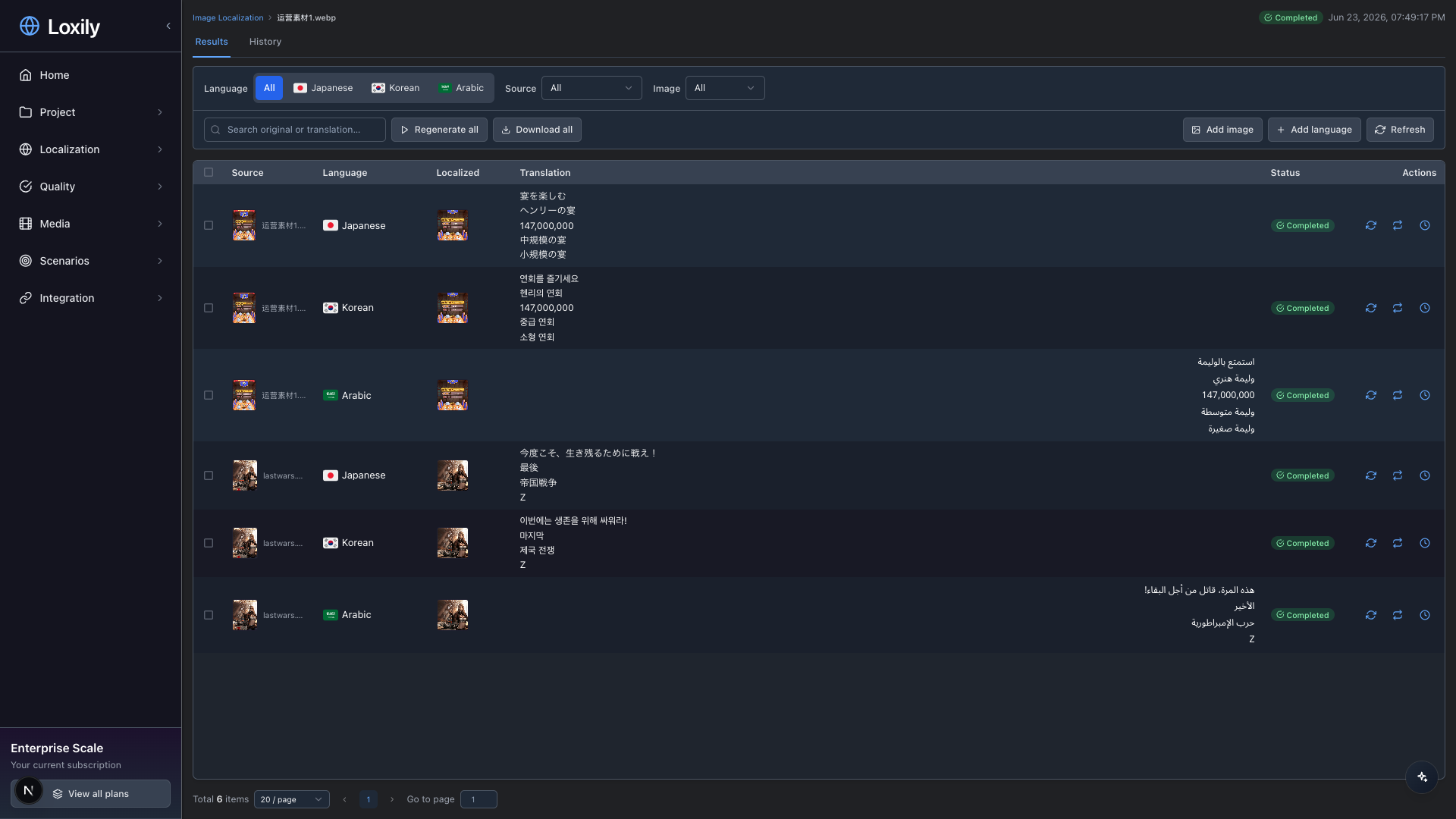
The results view at a glance: the source image sits on the left, with each target language's localized creative and per-segment translation, plus status, filters, and batch download all in one table.
Four steps that turn days into one task
1. Upload & pick languages
Drop in up to 20 images, check the target languages, and start. PNG / JPG / WEBP / GIF / BMP and other common formats are supported. If you need to, turn on "source-language filtering" first to translate only one specific source language.
2. AI does the work
In the background, a vision model detects the text, translates it in bulk, and re-renders the translation back into the image. The task list shows live progress (processing / done / failed), so you can go do something else.
3. Review & refine
A side-by-side table shows every source segment against its translation, fully WYSIWYG. Edit any translation, tweak the style on any region, and add languages or images at any time.
4. Export in one click
Batch-download the finished creatives for every language (ZIP, source images included), or export the detected copy and translations as CSV, by language or by your filters.
A concrete number: upload 20 images and pick 5 languages, and one task produces 100 localized creatives. What used to take days becomes a single batch.
Why this isn't "machine translation slapped on top"
There are plenty of "translate-and-paste" tools out there, but the output usually looks fake and needs reworking. Loxily is different on a few points that matter.
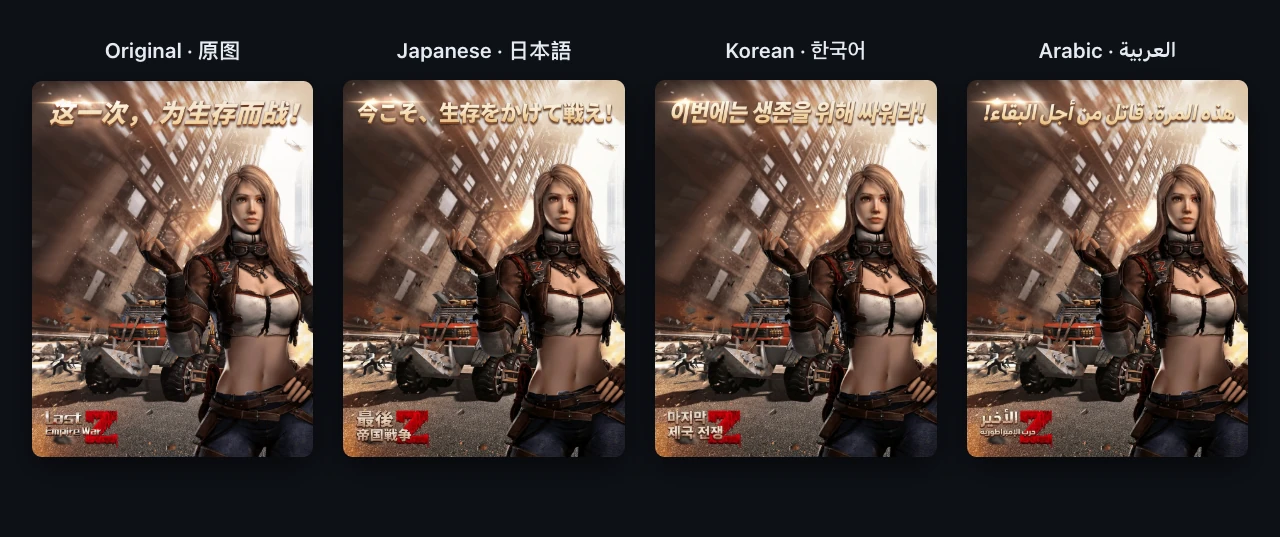
One store creative, localized into Japanese, Korean, and Arabic in a single pass — the text changes while the layout, colors, and font styling stay true to the original.
| Capability | What it solves |
|---|---|
| OCR-free detection | No reliance on traditional OCR; a vision model reads the text and layout directly, holding up better on stylized type, complex layouts, and embedded copy — and sparing you a separate OCR model to deploy and maintain. |
| Layout-preserving re-render | Translations are re-rendered at the original position, color, and font style to keep the original look; a single natural-language prompt ("make the font bigger, keep the original colors") fine-tunes it. |
| 130+ languages in one pass | One task outputs Simplified and Traditional Chinese, English, Japanese, Korean, German, French, Spanish, Portuguese, Russian, Arabic, Thai, Vietnamese, Indonesian, and more. |
| Text-region-level refinement | Results break down to the "text region" as the smallest unit, so you can fix a single translation and re-render only the changed region — no full-image rerun, and no collateral damage to regions you already tuned. |
| Source-language filtering | For mixed-language art, choose to translate only a given source language and leave the rest untouched — handy when brand terms shouldn't be translated. |
| Automatic term consistency | Translation taps into translation memory (TM) and termbase (TB), keeping brand names, proper nouns, and prior wording consistent across every image and every language. |
The key difference: it doesn't paint a layer of text over the original, it rebuilds after understanding the layout. That's why the output is deliverable as-is instead of landing back on a designer's desk — the same engineering mindset we stress in the game localization automated QA checklist, where truncation, overflow, and RTL only surface under real fonts.
It keeps growing after launch
Localization is never one-and-done — markets expand, assets pile up, copy changes. Image localization is built to iterate at any time:
- Add languages: add target languages to finished assets, automatically applied across all source images
- Add images: drop new images into an existing task, automatically run through every selected language
- Regenerate: keep the translation and only adjust the style, or retranslate from scratch
- Version management: every generation keeps a history snapshot you can compare, roll back, and pick from — down to a single text region
In other words, the first generation isn't the finish line; it's a localization asset you can keep maintaining.
Who needs it most
- Game global launches: event banners, gift-pack art, UI screenshots, localized in bulk
- E-commerce & advertising: product hero images and promo posters, quickly adapted for each market
- Growth & ad ops: social and push creatives, multilingual versions produced in one batch
If your assets have text baked in and you're going to multiple language markets, this pipeline saves a lot of repetitive work.
The takeaway
Multilingual assets used to be one of the most grinding chores on the road to global launch. Hand the images to AI — detection, translation, and re-rendering in one step — and all you do is review and download. If you've got a stack of images waiting for their multilingual versions right now, run your 20 most-edited assets through once and measure, against your real workload, how much time it gives back.