Multi-Engine AI Voiceover: One Place, Three Voice Engines — From Ready-Made Voices to Cloning Your Own
Pick a voice, type text, get a voiceover — powered by three switchable engines (ElevenLabs, Seed-TTS, Seed-Audio) spanning ready-made voices, character voices, and cloning.
Game voiceover is the most underestimated step on the road to global launch: the script is finally locked, and only then do you remember it still needs English, Japanese, and Korean versions — and recording booths, freelance actors, and line-by-line retakes stretch that out for weeks. Worse, every engine has its own temperament: one has the richest set of controls, one has ready-made character voices (especially in Chinese), and one can clone the timbre of a sample. You used to shuttle between three separate tools for that. Loxily now folds all three "voice engines" into one place: you just pick a voice and type text, and the engine follows automatically.
What Loxily voiceover actually does
In one sentence: pick a voice, type text, and AI generates the voiceover; behind it are three switchable voice engines — ElevenLabs, Seed-TTS, and Seed-Audio — covering everything from "the most general and tunable" to "clone a specific voice, act with strong emotion."
The point is you don't need to understand the engines first — you always pick a voice first, and that voice decides the engine automatically (how switching works, and the options you get, is spelled out below). Just like image localization, we compress the most stressful choice in multimodal delivery into a pipeline you don't have to think about.
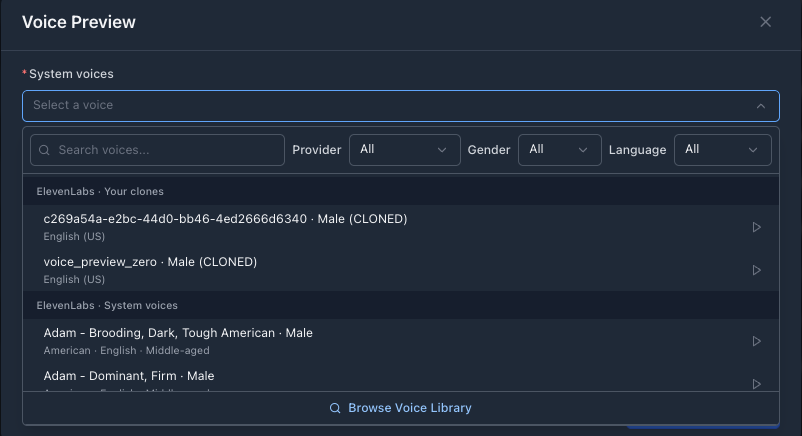
Pick a voice first: the dropdown is grouped by provider and filterable by gender / language — the voice you pick sets the default engine.
Meet the three voice engines in one line each
| Engine | In one line | Best for |
|---|---|---|
| ElevenLabs | Mainstream multilingual TTS; natural voices, the most tunable parameters | Most voiceovers; fine control of emotion / stability / speed |
| Seed-TTS | Pick a speaker from a fixed official catalog, type text, get speech | Ready-made, stable, varied character voices (especially Chinese) |
| Seed-Audio | Clone the timbre of a reference audio, or do highly expressive "acted" generation | Want the voice to "sound like a sample," or need strong emotional acting |
You do one thing: pick a voice, the engine follows
Voices in the dropdown are grouped by platform: "ElevenLabs · System voices," "Volcengine (CN)," and "BytePlus (Intl)." The "Provider" filter above only narrows the list of voices — it does not choose the engine; the engine is decided by the voice you actually pick.
A "Voice engine" toggle appears only when a voice supports multiple engines. Which options it shows depends on the voice you picked:
| Voice you picked | Selectable engines |
|---|---|
| An ElevenLabs voice | ElevenLabs (native) / Seed-Audio |
| A Seed-TTS voice (Volcengine) | Seed-TTS / Seed-Audio |
| A BytePlus (Intl) Seed voice | Seed-TTS only |
Where each engine is strong
ElevenLabs: the most general, the most tunable
When in doubt, start here. stability, similarity, speed (0.5–2.0), style, and speaker boost are all there, and emotion can be written straight into the text with tags like [excited] or [whispers]; language coverage runs 29–70+. It handles the vast majority of voiceover needs without drama.
Seed-TTS: pick a ready speaker from the official catalog
Use it when you just need a stable, ready-made character voice — especially in Chinese. It picks a speaker from a fixed official catalog and reads text verbatim up to ~5000 characters. It has controls of its own, too: pitch is tunable under Advanced Settings, and speed is set in the voice config; tone is handled via a separate "Delivery instruction" box (≤300 chars, not spoken). The Volcengine (CN) catalog has the most voices; the BytePlus (Intl) catalog adds international voices such as Arabic.
Seed-Audio: clone a voice, or act with expression
Use it when you want the voiceover to "sound like a sample," or you need strong emotional acting. It can clone a timbre from a reference audio or reuse a ready voice, and it has "verbatim" and "describe" modes — in describe mode, your text is treated as acting notes rather than lines, up to ~2000 characters. It also exposes speed (0.5–2.0x), pitch, and loudness as sliders (0 / 1.00x is neutral), so you can clone a timbre and still fine-tune it knob by knob before layering a describe prompt on top. It has the highest expressive ceiling of the three.
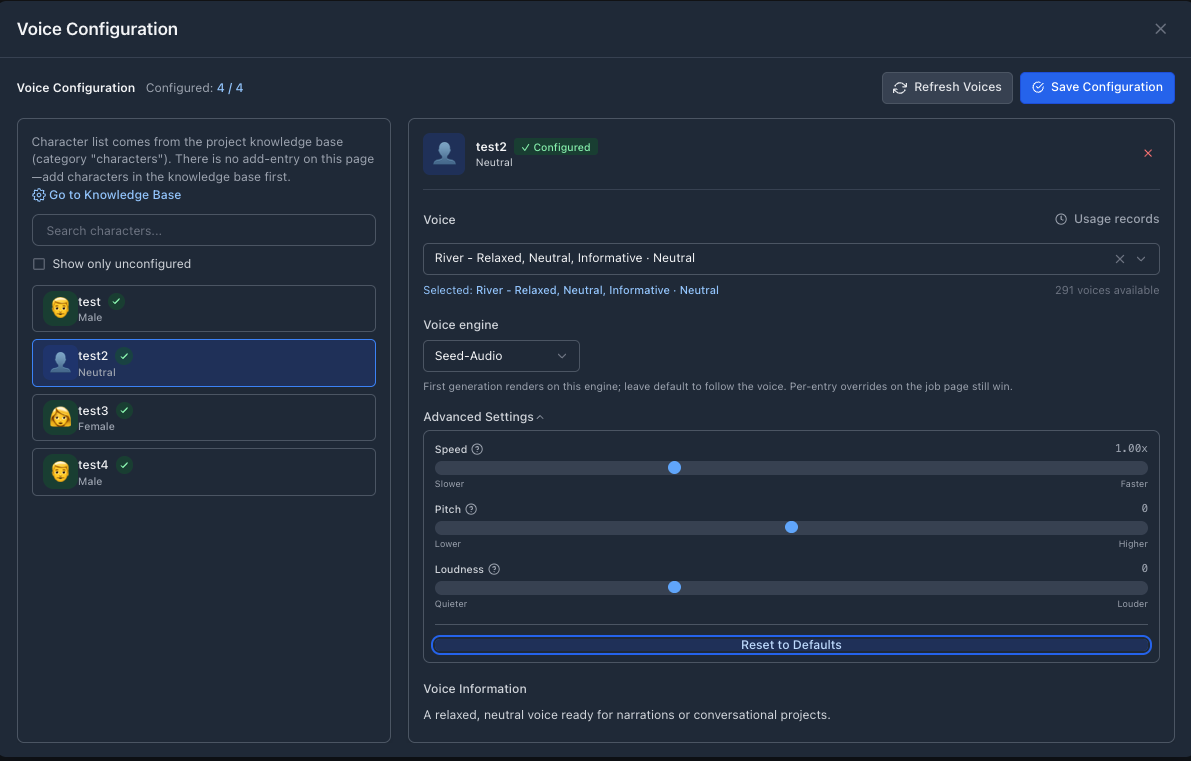
Seed is prosody-tunable now: Seed-Audio's speed / pitch / loudness are sliders (0 / 1.00x is neutral), available in both the preview and per-character config.
One "Emotion" input, understood by all three engines
You don't have to remember how each engine tunes tone: templates and the job-detail table share a single "Emotion" column (multi-select, comma-separated). Fill it once — you never touch the line itself — and the platform routes it per engine.
For example, with Emotion set to angry and the line Get out!, here's how each engine handles it:
| Engine | How the emotion is handled | What finally reaches the model |
|---|---|---|
| ElevenLabs | turned into an inline [tag] in the line | [angry] Get out! |
| Seed-TTS | rides a separate channel; the line stays verbatim | line Get out!, plus a side channel speak in an angry tone (never spoken) |
| Seed-Audio | wrapped into one read-instruction | in effect "read the following in an angry tone: Get out!" |
| Seed-Audio (with a Delivery description) | your description becomes the whole prompt; the emotion is ignored | e.g. "an exhausted old soldier grinds out: Get out!" |
Seed-Audio wraps the tone into the sentence because it has a single text input and no separate emotion field. Want a different mood across a batch of lines? Edit this one column.
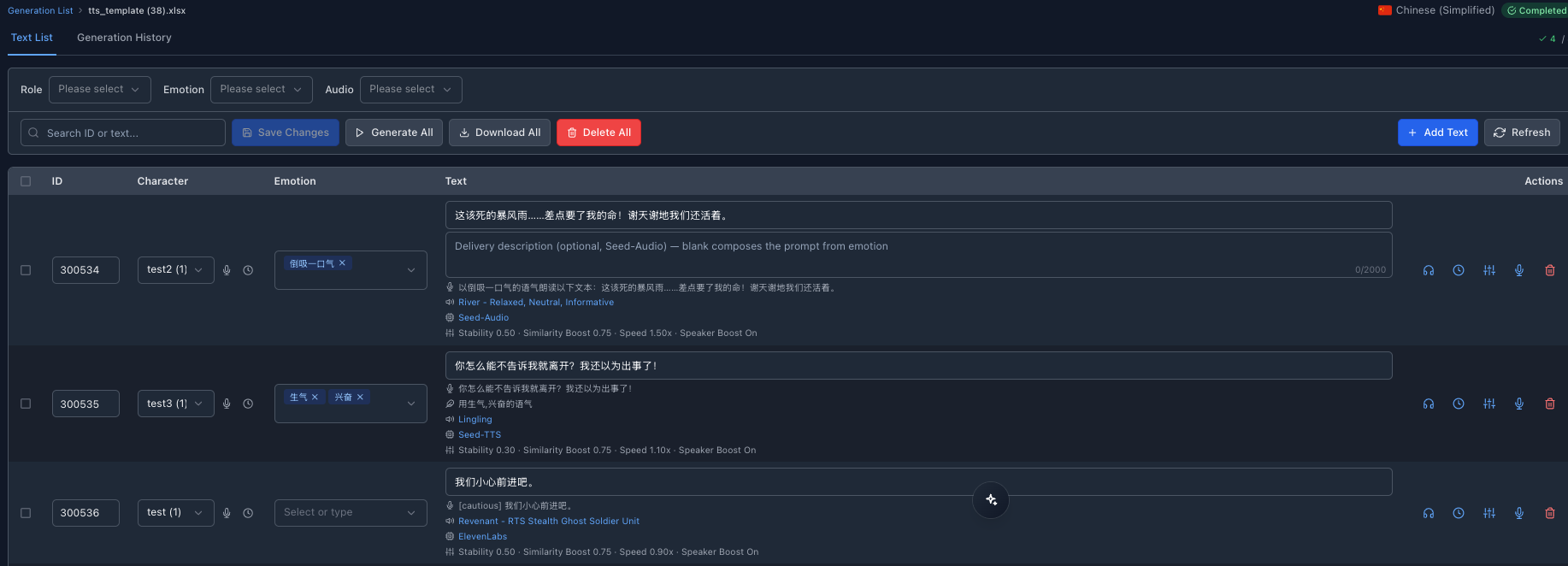
The job detail page's text list: the same "Emotion" column, with each row showing the actual instruction each engine resolves to — Seed-Audio's "read in a … tone," Seed-TTS's "speak in a … tone," and ElevenLabs' [tags].
No either/or: mix engines within one project
The real win of multiple engines isn't picking one and sticking with it — it's choosing the best fit per character, line by line: an English lead on ElevenLabs for the most natural read, a Chinese NPC on a ready Seed-TTS character voice, a signature voice you want to clone on Seed-Audio — then generating them all in one batch. In the detail screenshot above, Seed-Audio, Seed-TTS, and ElevenLabs each read their own rows inside a single job.
Mapping voices and engines per character — so one character stays the same voice across every line — is a big part of voiceover quality. For how to lock that voice down across languages, read character-aware TTS and voice cloning.
A few easy traps
- The stability slider and emotion dropdown vanished after switching to Seed? That's expected — only stability and the emotion dropdown are ElevenLabs-only, so Seed engines don't read them and they hide on switch. But speed and pitch don't go away: Seed has its own Advanced Settings — Seed-Audio offers speed / pitch / loudness, and Seed-TTS offers pitch (its speed is set in the voice config).
- Don't hand-type emotion tags into Seed text.
[excited]and[whispers]are only recognized by ElevenLabs; typed into Seed text they get read aloud literally. To add emotion to Seed, use the "Emotion" column above — it routes to the right channel for each engine automatically. - Volcengine (CN) vs BytePlus (Intl) are the same family of Seed voices on different regional accounts: the former has the most voices and can switch to Seed-Audio; the latter adds international voices like Arabic but supports Seed-TTS only. Just pick whichever has the voice/language you need.
Who needs it most
- Game character voiceover: pick a ready character voice from the official catalog, or clone a dedicated voice with Seed-Audio, then batch-generate across languages
- Growth & advertising: multilingual narration for trailers, push, and short social videos, generated in one pass
- Scenes that need real acting: trailers and story-driven content, pushing emotional layers out of Seed-Audio's describe mode
If your content is heading to multiple language markets and you care about how it sounds, this multi-engine voiceover saves a lot of the time you used to spend shuttling between tools. For a more systematic look at how AI lands in game context, read the complete guide to AI game localization.
The takeaway
Voiceover shouldn't be "one engine making do with every scene." Loxily folds ElevenLabs, Seed-TTS, and Seed-Audio into one place — you pick a voice, the engine follows, and you switch with one click when you need to. Got a batch of lines waiting to be voiced? Take one representative line, run it through all three engines, and let your own ears decide which fits your content best.
<!-- All three inline images are real English-UI product screenshots (voice-preview dropdown + voice-config Seed-Audio advanced settings + job-detail text list, with the account-bearing top bar cropped out). Sample row content in the detail view is the test job's original Chinese lines. For an audio A/B sample, coordinate with product / frontend. -->